
 About video editing |

Benvenuto Visitatore(Log In|Registrati)
  |

 1 Jul 2014, 05:59
Messaggio
#1
|
|
  Gruppo: OldGamer Messaggi: 332 Iscritto il: 27 June 14 Utente Nr.: 20.463 BGE Command & Conquer: Tiberian Dawn SO Windows7  |
Ah, found the thread:
http://forums.cncnz.com/topic/17046-transl...deos-to-spanish That should have text files with a lot of the the spoken text in the videos transcribed, so I guess that's a good place to start  CITAZIONE (selven @ 30 Jun 2014, 23:46)  other question about video, in what format they are? are you able to decode and re-encode for the game? if yes i will try to contact some subbers to add the subtitle directly on them The format is VQA (Vectorized Quantum Animation, if I remember correctly), which is a format created by Westwood themselves. The videos are normally a pair; the VQA is the actual video, and an aditional VQP file allows stretching the 320x200 (DOS C&C) video to 640x400 in C&C95. There is an encoder for them, but re-encoding them is a tricky process, since the video format is 256-colour, and normally one video uses one single colour palette (or, for some longer ones, one palette per scene). So you have to convert the video to frame, and either get subtitles on these frames without modifying the palette, or convert them back to 256-colour after adding the subtitles, using a tool like RAD Video Tools. The spanish translation thread I linked to has more info on that; look for the post made by UGordan, he made the only existing converter for the VQA format. The actual converter app can be found here, on the Project Perfect Mod website: http://www.ppmsite.com/forum/viewtopic.php?t=8337 It seems jsbrigo already looked into this, though; I have a subtitled version of GENERIC.VQA on my disk. It's incorrect, though; the video itself is stretched to 320x200 for some reason, while it should be 320x156. [cut] Messaggio modificato da jsbrigo il 2 Jul 2014, 17:58 -------------------- Expert on all things Command & Conquer 1. Creator of a bunch of small modding tools.
|
 |
 
|


|
2 Jul 2014, 09:08
Messaggio
#2
|
|
|
Gruppo: Gamer Messaggi: 929 Iscritto il: 27 June 12 Da: Ravenna Utente Nr.: 19.437 BGE The Last of Us Playing Poco e niente SO Windows7 |
About video if i understand the problem is the limit of format (256 color 320x200px)
The video decoded still have the right format or will be changed? If yes we have only to add subtitls eithout change the format If no we will have the same problem of spanish Do you have an mail to contact tbe guys that done the spanish encryption? Messaggio modificato da selven il 2 Jul 2014, 09:29 |
|
|
|
|
2 Jul 2014, 10:01
Messaggio
#3
|
|
|
Gruppo: OldGamer Messaggi: 332 Iscritto il: 27 June 14 Utente Nr.: 20.463 BGE Command & Conquer: Tiberian Dawn SO Windows7 |
It is more complex than that... the encoder we have for VQA is simplified compared to the one Westwood used. UGordan's encoder can only do palette switches every 8 frames (or whatever you set the key frame to), but Westwood's encoder wasn't limited to that. This means that for long videos with palette changes (like the game intro), even simply decoding and then re-encoding them doesn't always work correctly. Wolfstain noted that using 6 as key frame worked better on the intro video, but either way, to preserve quality, the palettes have to be redone for these different pieces.
Not to mention, I haven't found any app that keeps the frames 8-bit when adding text on them. One interesting suggestion in that aspect: when making the spanish subtitles, wolfstain enlarged the canvas of the frames from 320x156 to the full 320x200 with black space. This doesn't change the position of the video ingame (videos are always centered), but it adds space below the actual video to add the subtitles 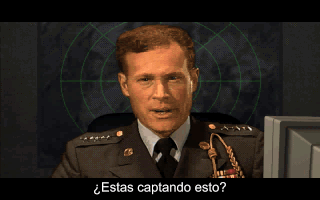 For the record... for converting VQA videos to frames, you can use the XCC Utilities by Olaf Van Der Spek. The principle for converting stuff in XCC Mixer is always the same: http://nyerguds.arsaneus-design.com/junk/t...xcc-copy-as.png I think the VQA encoder only accepts PCX frames, but mass frame conversion is easy when you use the RAD Video Tools. This can also be used to enlarge the frame canvases (by using negative cropping), and to split it up in different parts with different palettes. For dealing with splitting up the video into different-paletted parts, it's also useful to have a mass rename/copy tool, since the output from RAD tools always starts with frame #0. Someone made such a tool for me a long time ago: http://nyerguds.arsaneus-design.com/tools/...py_tool_1.1.rar This is the basic way to prepare high-colour frames for conversion to VQA by reducing their palette. Note that the scaling thing to 320x200 is wrong - since you are handling original videos here they should not be scaled! (though if they are expanded to 320x200 with black borders, this obviously doesn't matter) http://nyerguds.arsaneus-design.com/junk/t...convert_vid.png I'd have to experiment a bit to see how to negative-crop them into getting these black borders, though. On a somewhat related note... I just released video packs on ModDB
Messaggio modificato da Nyerguds il 3 Jul 2014, 11:45 -------------------- Expert on all things Command & Conquer 1. Creator of a bunch of small modding tools.
|
|
|
|
|
2 Jul 2014, 10:09
Messaggio
#4
|
|
|
Gruppo: Gamer Messaggi: 929 Iscritto il: 27 June 12 Da: Ravenna Utente Nr.: 19.437 BGE The Last of Us Playing Poco e niente SO Windows7 |
So the only way is do it frame by frame...
Ok for now i will waiting the new pack of patch to see how text work in game |
|
|
|
|
2 Jul 2014, 10:49
Messaggio
#5
|
|
|
Gruppo: OldGamer Messaggi: 332 Iscritto il: 27 June 14 Utente Nr.: 20.463 BGE Command & Conquer: Tiberian Dawn SO Windows7 |
Oh, wow. A whole forum section? Usually a single thread is enough
 It might be best to create a new thread for the videos, then. CITAZIONE (selven @ 2 Jul 2014, 11:09) So the only way is do it frame by frame... No, that's complete madness. it's much simpler to use some program to do it in bulk, and just convert it back to 256 colour afterwards. Nadersith, who made the Tiberian Sun: Firestorm subtitles, mentioned using a program to make an actual subtitles file, and then using VirtualDub with a Subtitler plugin to put it on the video. Though that would require the process to be: Original VQA -> original frames -> convert to raw AVI with RAD Tools, expanding the size to 320x200 -> add subtitles with VirtualDub, export as raw AVI -> use RAD Tools to convert subtitled AVI to 256-colour PCX frames -> use VQA encoder to create final subtitled VQA+VQP CITAZIONE (selven @ 2 Jul 2014, 11:09) Ok for now i will waiting the new pack of patch to see how text work in game Right. I'll make a new version [edit] On the mission briefings: you don't have to bother re-aligning the lines; the game sees it all as one long line unless you add those ## line breaks. [edit again] New version: http://nyerguds.arsaneus-design.com/cnc95u...alian_beta3.exe Messaggio modificato da Nyerguds il 2 Jul 2014, 11:25 -------------------- Expert on all things Command & Conquer 1. Creator of a bunch of small modding tools.
|
|
|
|
|
2 Jul 2014, 11:25
Messaggio
#6
|
|
|
Gruppo: Gamer Messaggi: 929 Iscritto il: 27 June 12 Da: Ravenna Utente Nr.: 19.437 BGE The Last of Us Playing Poco e niente SO Windows7 |
Uhm actually i don't know i not know video edit program but maybe can be easyest start from spanish movie and mass replace the text if is possible to make it automatic this should cut off the timing part
About mission briefing good to know for the future |
|
|
|
|
2 Jul 2014, 12:48
Messaggio
#7
|
|
|
Gruppo: OldGamer Messaggi: 332 Iscritto il: 27 June 14 Utente Nr.: 20.463 BGE Command & Conquer: Tiberian Dawn SO Windows7 |
CITAZIONE (selven @ 2 Jul 2014, 12:25) but maybe can be easyest start from spanish movie and mass replace the text That's not a good idea. Like jpeg/mpeg, VQA is a lossy format: the quality gets worse every time you re-encode it, so you should use the originals as source. Though of course you can use the Spanish ones to get the timing right, and to help make the translation easier Also, not all the text in the spanish videos is on one line like it's shown there; sometimes it's 2 lines and it goes a bit over the video image. Maybe we can ask wolfstain what programs he used... Messaggio modificato da jsbrigo il 2 Jul 2014, 18:06 -------------------- Expert on all things Command & Conquer 1. Creator of a bunch of small modding tools.
|
|
|
|
|
2 Jul 2014, 18:07
Messaggio
#8
|
|
  Gruppo: Oldgame Editor Messaggi: 1.025 Iscritto il: 29 February 08 Da: bangkok, tailandia Utente Nr.: 12.138 BGE ไม่รู้ Playing JA 1 in ITALIANO :) - finito! SO Windows7 OGI Supporter |
yes please, colletting more and more info about video editing process could make our task esier
sì grazie, raccogliere sempre più info sul processo di video editing potrebbe rendere il nostro compito più facile -------------------- [img][/img] "I'll finish it... eventually." . . . GOG :( Equipaggiamento RetroAudio: Roland MT-32 + Roland SC-50 |
|
|
|
|
2 Jul 2014, 18:19
Messaggio
#9
|
|
|
Gruppo: Gamer Messaggi: 929 Iscritto il: 27 June 12 Da: Ravenna Utente Nr.: 19.437 BGE The Last of Us Playing Poco e niente SO Windows7 |
ok i'm completly out form video encoding so i will check transcription and see to start translation
|
|
|
|
|
2 Jul 2014, 21:32
Messaggio
#10
|
|
|
Gruppo: OldGamer Messaggi: 332 Iscritto il: 27 June 14 Utente Nr.: 20.463 BGE Command & Conquer: Tiberian Dawn SO Windows7 |
CITAZIONE (selven @ 2 Jul 2014, 19:19) ok i'm completly out form video encoding so i will check transcription and see to start translation You could also do the timing based on the Spanish videos, if you want. XCC Mixer can play the videos, and while it doesn't have sound, it does allow easy seeking in the video (which no other VQA player can do), and it shows the frame numbers, so you can easily write down exactly at which frame numbers the text blocks start and stop in the Spanish version. To view VQA videos in XCC Mixer, simply double-click the VQA file in the XCC Mixer file browser. Messaggio modificato da Nyerguds il 2 Jul 2014, 21:33 -------------------- Expert on all things Command & Conquer 1. Creator of a bunch of small modding tools.
|
|
|
|
|
2 Jul 2014, 21:35
Messaggio
#11
|
|
|
Gruppo: Gamer Messaggi: 929 Iscritto il: 27 June 12 Da: Ravenna Utente Nr.: 19.437 BGE The Last of Us Playing Poco e niente SO Windows7 |
for now i will translte the text, my first think it was to ask to a community of subbers, but if there is so many problem is better that someone more expert will look to this ;P
|
|
|
|
|
2 Jul 2014, 21:54
Messaggio
#12
|
|
|
Gruppo: OldGamer Messaggi: 332 Iscritto il: 27 June 14 Utente Nr.: 20.463 BGE Command & Conquer: Tiberian Dawn SO Windows7 |
Sadly, this is something I've never really done myself. I've only converted videos from other sources (like the Playstation-only Red Alert expansion-missions briefings) to VQA. I've never actually done any hard-subtitling like this.
I really hope wolfstain replies on my message, to help us along with this. -------------------- Expert on all things Command & Conquer 1. Creator of a bunch of small modding tools.
|
|
|
|
|
3 Jul 2014, 11:09
Messaggio
#13
|
|
|
Gruppo: OldGamer Messaggi: 332 Iscritto il: 27 June 14 Utente Nr.: 20.463 BGE Command & Conquer: Tiberian Dawn SO Windows7 |
Wolfstain replied to my message, and told me he indeed did it the same way as Nadersith, using the Subtitle plugin for virtualdub. As for the actual scene change problems, he said that was all just trial and error :-\
Sadly, he lost the subtitle files he created for that project. [edit] Here's the way to use RAD Video Tools to expand the frames from 320x156 videos to 320x200 by adding black borders. The "-22" there is (156-200)/2, so if the video would have a different height than 156, it's still easy to calculate. I don't think any of the videos differ from that 156, though.  You can also immediately let this save the result to AVI format, to edit the video in VirtualDub. You will have to set the "frame rate -> force" option to "15" then. NEVER use any codecs on AVI files you save, though. Always use "uncompressed" as format. Otherwise, the quality is decreased every time. Messaggio modificato da Nyerguds il 31 Jan 2021, 12:19 -------------------- Expert on all things Command & Conquer 1. Creator of a bunch of small modding tools.
|
|
|
|
|
3 Jul 2014, 11:32
Messaggio
#14
|
|
|
Gruppo: Gamer Messaggi: 929 Iscritto il: 27 June 12 Da: Ravenna Utente Nr.: 19.437 BGE The Last of Us Playing Poco e niente SO Windows7 |
Uhm is not possible to leave all 44 pixel on bottom to manage subtitle?
|
|
|
|
|
3 Jul 2014, 18:50
Messaggio
#15
|
|
|
Gruppo: OldGamer Messaggi: 332 Iscritto il: 27 June 14 Utente Nr.: 20.463 BGE Command & Conquer: Tiberian Dawn SO Windows7 |
Yes, but that looks very strange in the game, with the video moved to the top :-\
-------------------- Expert on all things Command & Conquer 1. Creator of a bunch of small modding tools.
|
|
|
|
|
3 Jul 2014, 19:08
Messaggio
#16
|
|
|
Gruppo: Gamer Messaggi: 929 Iscritto il: 27 June 12 Da: Ravenna Utente Nr.: 19.437 BGE The Last of Us Playing Poco e niente SO Windows7 |
uhm you're right, well while me and jsbrigo will finish translation/consolidation of files can you please esport the needed movie and prepare them to be subbed? (you seems the most skilled on this right now and should be also a good tool package for other localization)
|
|
|
|
|
3 Jul 2014, 22:06
Messaggio
#17
|
|
|
Gruppo: OldGamer Messaggi: 332 Iscritto il: 27 June 14 Utente Nr.: 20.463 BGE Command & Conquer: Tiberian Dawn SO Windows7 |
Exporting is the easiest part, actually. Just copy as frames in XCC Mixer, and convert the frames to avi with the added black space with RAD tools. It would probably take much more time to transfer the raw avi files over the internet than it would take to just convert them yourself.
Steps: -In XCC Mixer, browse to the VQA video in one of the file browsers, and with the other file browser, browse to the folder where you want to put the converted frames. -Right-click the VQA video, select "Copy As PNG" -Open RAD Video Tools, go to the folder where those files are, select the one numbered as 0000, and press "Convert a file". It will tell you that the file appears to be part of a sequence, and will ask if you want to treat it as a single animation. Click "Yes". -Set the output type to AVI, and give the file the same name as the original vqa (but with .avi, of course) -Set the frame rate's "Force (no adding or removing) to" option to 15 -Set the cropping's "top" value to -22 (or -44 to have more space below), and the cropping width and height to 320x200. -Click "convert". It will ask which codec to use. Select "Full Frames (Uncompressed)". -Delete the loose frames, and keep the avi for dubbing in VirtualDub. Note that this video will not contain audio. It is purely meant for the conversion. Adding audio to the video again is the very last step in the whole process; the audio is given to the VQA converter to merge with the encoded video. Also, it's really hard to add audio to videos with RAD tools. As I said before, to simply play the VQA videos in Windows, install the GMF codec, and you will be able to play it in any media player you have. RAD Video tools will remember the conversion settings, so you only have to set that stuff once. Messaggio modificato da Nyerguds il 31 Jan 2021, 12:22 -------------------- Expert on all things Command & Conquer 1. Creator of a bunch of small modding tools.
|
|
|
|
|
1 utenti stanno leggendo questa discussione (1 visitatori e 0 utenti anonimi)
0 utenti:
| Versione Lo-Fi | Oggi è il: 12th November 2026 - 16:44 |